News
For Media Inquiries please fill out this form.
ATAK Indoor Location Enhancements
December 23rd, 2025
COTAK Program Team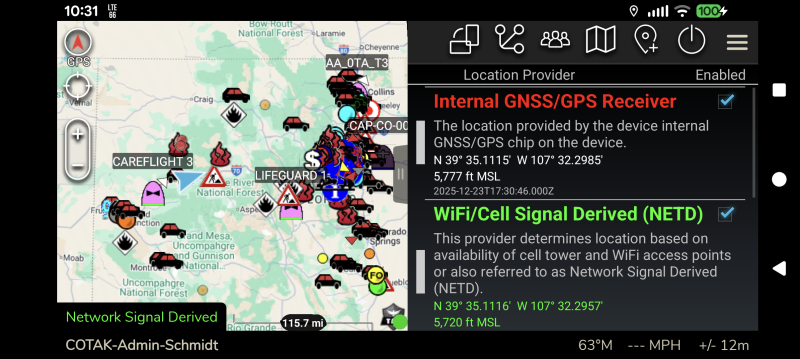
The Android version of TAK (ATAK) has been updated to version 5.6 in the Play Store. As part of this update ATAK now has the ability to use Google’s location services to locate you, in addition to the device’s internal GPS chip. Activating this feature will improve ATAK’s ability to locate you inside buildings or dense urban areas where GPS signals are degraded. Note that iTAK has an equivalent capability enabled by default, so iTAK users do not need to take any action!
Due to ATAK’s extensive use in the military this feature is not enabled by default. To turn it on users should open ATAK, then tap on the three stacked lines in the top right corner of the app to open the tool list, then tap on “Overlays.” In the Overlay Manager that appears scroll toward the bottom of the list and tap on the “Location Input Manager.”
In this new tool is a list of the possible sources of location data for ATAK. The “WiFi/Cell Signal Derived (NETD)” option is new, and may be checked on to improve ATAK’s location accuracy, as it uses Google’s location services to improve your positioning similar to many other smartphone apps.
Users should leave the “Internal GNSS/GPS Receiver” option checked as well, as this allows the app to use both types of technologies to locate you as accurately as possible. When these settings are applied and GPS is lost, ATAK will begin relying on the network signal to locate you, and a special message will appear in the bottom left corner of the app (see attached screenshot). Note that the bottom options in this tool refer to military GPS units and may be left unchecked.